🔥 Modulify.ai - Design Webflow sites with AI


Dive deep into our recent blog post featuring expert insights and valuable information for SaaS enthusiasts.
Nobody tells you when your portfolio costs you a job. Hiring managers don't send rejection emails explaining that your loading time was too slow, your case studies lacked depth, or your contact form was broken.
They just move on to the next candidate. You never know what opportunity you missed or why.
I've been on both sides of this. As a hiring designer, I've disqualified portfolios within seconds for easily fixable problems. The difference between getting hired and getting ignored often comes down to avoidable errors.
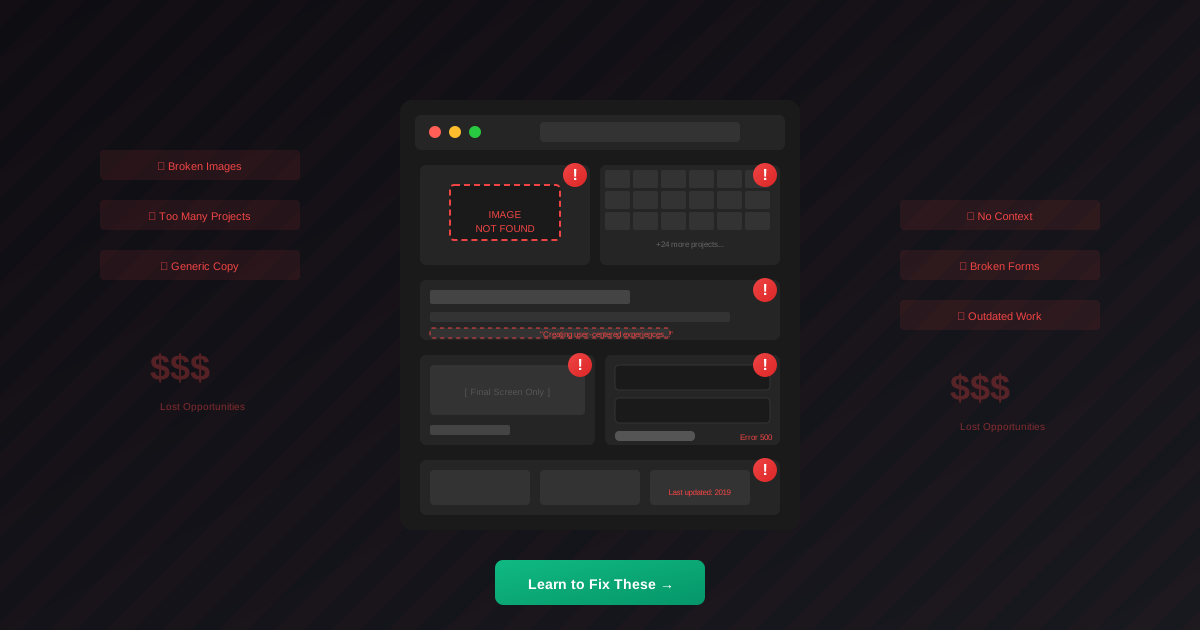
Quantity signals poor judgment. When I see a portfolio with thirty projects, I immediately question the designer's ability to edit and prioritize. Nobody's thirty projects are equally impressive. Showing all of them suggests you can't tell which ones are actually good.
Three to five exceptional case studies always beat twenty mediocre thumbnails. Each project you include should earn its place. If you're tempted to add something because "it fills out the portfolio," that's exactly the wrong reason.
Final screens without context tell me nothing about your capabilities. I can see you made something that looks polished, but I have no idea whether you understood the problem, made smart decisions, or delivered meaningful results.
Every case study needs the story behind the work. What challenge existed? What constraints shaped the solution? What alternatives did you consider? What impact did the final design achieve?
Nothing disqualifies faster than a portfolio that doesn't work. Broken links, images that don't load, forms that error out, layouts that collapse on mobile—these problems scream carelessness. If you can't execute your own portfolio correctly, why would I trust you with my product?
Test everything. Click every link. Submit your own contact form. View your portfolio on actual mobile devices, not just browser simulations.
Portfolios without personality blur together. After reviewing twenty that all describe "creating user-centered experiences" in the same corporate language, I can't distinguish one designer from another.
Your voice matters. Write like yourself, not like a press release. Share what genuinely excites you about design. Let your specific perspective and interests show through.
Old projects can actively damage your positioning. Work from five years ago might represent outdated design patterns, inferior skills, or irrelevant experience. Keeping it visible suggests either poor judgment or stagnant development.
Regular portfolio audits matter. Review every project annually at minimum. Does this still represent your current abilities? Does it showcase relevant skills for opportunities you want?
Generic portfolios get generic results. Designing enterprise SaaS products but showcasing only branding work doesn't make sense. Your portfolio should demonstrate capabilities relevant to opportunities you actually want.
Research your targets. What problems do these companies face? What skills do they likely need? Then position your portfolio to answer those specific questions.
If you're not getting responses proportional to your application effort, the portfolio likely needs work. Ask trusted peers for honest feedback.
Risky for designers. Your portfolio demonstrates your abilities. Having someone else design it undermines that demonstration.
Add significant new work within a few months of completion. Review and potentially remove outdated projects annually.
Ready to fix your portfolio? Wonderlist's 30 portfolio Figma templates give you professionally structured foundations, so you can focus on presenting your work instead of wrestling with layout decisions.
Latest Insights
Dive into our blog to discover insightful articles covering a variety of topics tailored for SaaS platforms.


Design By OwlsTech Service